Billing & taxes
Money in Zitlin moves through three things, in order: a folio collects what a guest owes, an invoice turns that into a numbered tax document, and settling records how they paid.
Understanding where one ends and the next begins saves a lot of confusion — in particular, generating an invoice is the point of no return.
Folios
A folio is the bill. It belongs to the lead guest, and every booking on it contributes charges — see Front desk for how bookings and folios relate.
| Charges come from | Where they are added |
|---|---|
| Room | The nightly price grid on each booking. |
| Food & beverage | Sent up from the restaurant, or ordered on the booking's Room Service tab. |
| Extras | The booking's Add Ons tab — airport pickup, extra bed, laundry. |
| Items issued to the room | The booking's Inventory tab. |
Money already received goes on the Prepayments tab: cash, card, bank transfer, QR, complimentary, or an OTA-collected payment. Record prepayments as they arrive and the balance at check-out looks after itself.
Prepayments and security deposits are two different things
A prepayment is money towards the bill. It reduces what the guest owes and ends up on their invoice. A security deposit is money you are holding for the guest and giving back at check-out — it never touches the bill. They sit on separate tabs on the folio for exactly that reason.
If you have been recording refundable deposits on the Prepayments tab, start using the Security Deposits tab instead. Zitlin cannot tell the two apart in what you have already entered, so nothing is moved for you.
Prepayment receipts
Every prepayment you record gets its own numbered receipt, in a series of its
own: ZIT/26-27/AD-12. From the prepayment you can Print it or send it on
WhatsApp, and the number goes with it either way.
The receipt is an acknowledgement of money received, not a tax document. Tax is charged on the final invoice, and the receipt says so — that is what stops the same money being counted twice.
A prepayment stays held until the invoice that consumes it is generated, at which point it becomes adjusted. Held prepayments are money you are looking after on the guest's behalf; they are not revenue until they are adjusted against a bill.
Prepayments on a cancelled booking stay held
Cancelling a booking does not touch money already recorded — it is still yours to account for, and it keeps showing in Prepayments Held on the Revenue report until you deal with it. That is deliberate: Zitlin will not quietly decide whether you kept it or refunded it.
Security deposits
Folio → Security Deposits. Refundable money, held and given back. It is never applied to the bill, never counted as takings, and never taxed.
Two kinds, and the difference matters at every step:
| Kind | What it is |
|---|---|
| Collected | Cash, card or QR you actually took. It goes into your drawer and has to be counted at the shift close. |
| Card pre-auth | A hold on the guest's card. No money moves, so it reaches no drawer and appears in no shift count. Record the authorisation code and the date the hold lapses. |
Each one gets a numbered receipt in its own series — ZIT/26-27/SD-4 — which
you can print or send on WhatsApp. The slip says plainly that the money is
refundable and is not a payment towards the bill.
At check-out, open the deposit and choose Return. Enter an amount only if you are keeping part of it for damage; Zitlin works out the rest, because a half-finished deposit is a loose end nothing would ever chase.
What happens when you keep part of a deposit
The retained amount goes onto the folio as a prepayment, so the invoice treats it like any other money received. Add the damage itself as a charge on the booking's Add Ons tab — then the invoice taxes the charge and the retained deposit pays for it, and the two net out correctly.
Do not simply keep the money and leave it at that. Revenue nobody invoices is revenue nobody declares.
Checking out does not return the deposit
Zitlin warns you at check-out if you are still holding one, but it will not stop the guest leaving over paperwork. Anything still held on a departed guest appears on the Exceptions report until you deal with it.
Two folio-wide settings under Modify affect every invoice it produces:
| Setting | What it does |
|---|---|
| Room discount / Food discount | Percentages off, applied separately to rooms and to F&B. |
| Combined invoice | One invoice for everything, or two — room and F&B separately. |
Discounts belong on the folio, not the invoice
Setting them before you generate means the invoice is right first time. You can change a discount on a generated invoice, but only an Admin or Accountant can, and it is an edit to a tax document rather than a normal adjustment.
Invoices
Generate Invoice on the booking or the restaurant order. Nothing is invoiced automatically — you decide when.
Depending on the folio's Combined invoice setting you get one document or two, and each carries your property header, a document number, the line items, the discount, the tax breakdown, any prepayments, and the balance due.
Prepayments are listed one line per receipt — its number, its date and its amount — followed by the total deducted. So the invoice says exactly which receipts it absorbed, and your accountant does not have to work it out. Security deposits appear nowhere on it, because they are not payments.
The document number
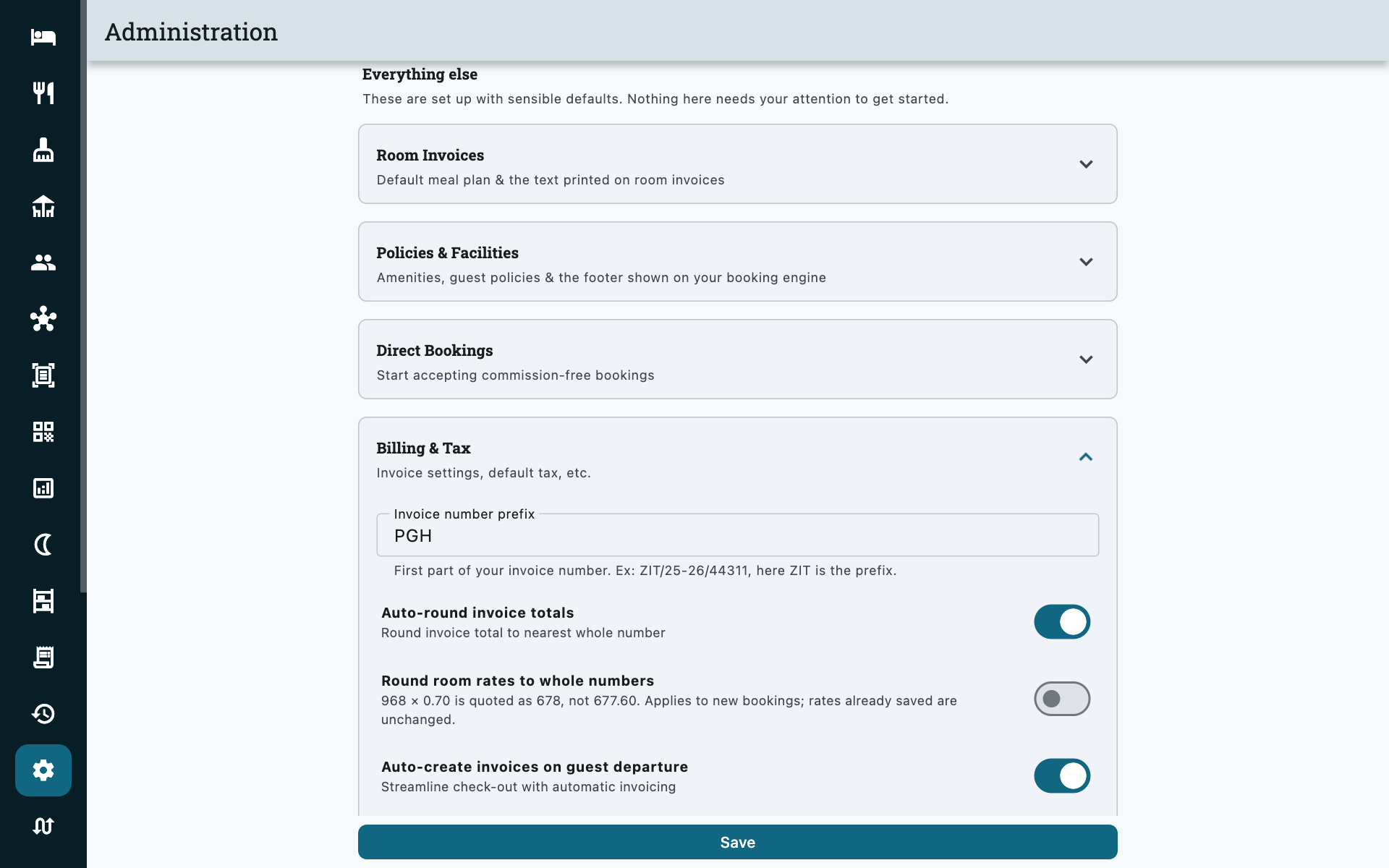
Numbers look like ZIT/26-27/RO-1299 — your prefix, the financial year, a
category code and the serial.
Prepayment receipts run a separate series ending AD-, and security
deposits a third ending SD-, because each is a different kind of document.
Properties using a single invoice sequence still get both. The AD- prefix is
unchanged from before prepayments were renamed — receipts already printed stay
valid.
The serial restarts every financial year
That is deliberate and is what your tax authority expects. It means the bare number repeats across years — the full string, including the year, is what uniquely identifies an invoice. Quote the whole thing when talking to your accountant.
Correcting a generated invoice
Two routes, and which one you need depends on how much is wrong.
| Situation | Do this | Who can |
|---|---|---|
| A price, quantity, discount or the title is wrong | Modify | Admin, Accountant |
| The whole invoice should not exist, or the booking needs re-editing | Void | Admin |
Modify lets you change the title/narration, date of issue, discount rate, and each line's quantity and unit price.
You cannot delete a line — set its quantity to 0
The app tells you this when you try. A zero-quantity line drops out of the totals while leaving the document's structure intact.
Void marks the invoice void and unlocks the booking or order for editing again, so you can fix the underlying charges and generate a fresh invoice. The voided document is not deleted — it stays in your records.
Generating an invoice locks the booking
Once a room invoice exists you cannot edit that booking's charges, and once a restaurant order is invoiced no more kitchen tickets can be added to it. Add every charge before you generate. If you have to reopen it, Void is the only way back, and that needs an Admin.
Sharing it
From the invoice you can Share, Print, save as PDF, or show an Online link as a QR code for the guest to open on their phone. Room-service invoices covering several days can also be printed split by date, one thermal receipt per day.
Settling
Settle records how the guest paid. You can split one invoice across several payment modes — part cash, part card.
| Mode | |
|---|---|
| Cash | |
| Credit | On account, to be collected later. Asks which company — see Credit accounts. |
| Wire transfer | |
| Credit/Debit card | |
| QR | UPI, Thai QR and the other regional schemes |
| NC / Complimentary | Nothing to collect |
| OTA / Third party | The channel collected it |
The payments must add up to the amount due, exactly
Zitlin rejects a settlement whose parts do not total the balance. Prepayments are already subtracted from that balance, so settle the due figure, not the invoice total. Security deposits are not, because they are not payments — return them separately.
An unsettled invoice is not a problem in itself — it is simply money you are still owed. Checking a guest out never requires one.
Credit is the one mode that asks a second question
Settling on account means somebody owes you, so Zitlin makes you say who. The bill then lands on that company's ledger, where it can be aged, chased and paid off. See Credit accounts.
QR payments
Zitlin can show a payment QR carrying the exact amount owed, so the guest scans and confirms without typing anything. It appears as a Pay button on the invoice, labelled with your scheme.
Supported in 24 countries, including UPI (India), PromptPay/Thai QR, VietQR, QRIS, DuitNow, SGQR, QR Ph, FPS, KHQR, LANKAQR, FonePay, Bangla QR, Pix and SEPA QR.
Set up by Zitlin, and the money goes straight to you
Send support the account you want to be paid into and they will configure it. There is no payment processor in between — funds move directly from your guest to your bank or wallet, so no commission is deducted and nothing is held for a settlement period.
The trade-off is that Zitlin cannot see your bank account, so it does not know the money arrived. You confirm the payment, which is what the Settle step is for.
Taxes
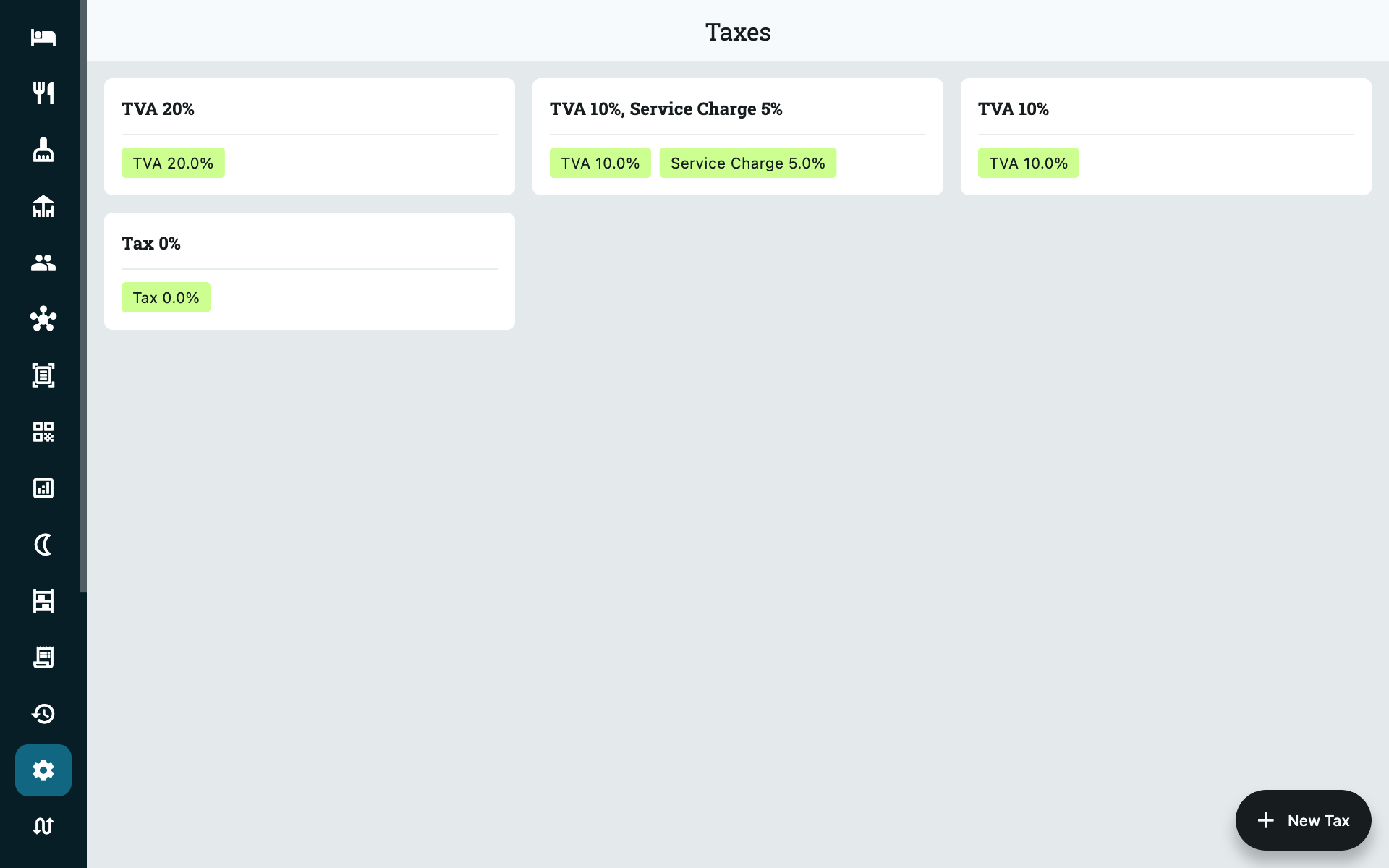
Taxes for your country ship pre-configured — you pick one on each room type, add-on and dish rather than defining rates yourself. A tax can carry several components, each with its own name and rate, so a combined levy such as GST prints as separate lines on the invoice.
Add your own under Settings → More → Taxes only if there is a genuine gap.
Inclusive or exclusive
One property-wide switch, Prices include tax under Settings → Admin → Billing & Tax, decides how every price you have entered is read:
| Setting | Effect on a price of 100 at 10% tax |
|---|---|
| On (inclusive) | Guest pays 100. Tax of 9.09 is extracted from within. |
| Off (exclusive) | Guest pays 110. Tax of 10 is added on top. |
Price fields throughout Zitlin are labelled (including tax) or (excluding tax) to match, so you can always see which way round you are working.
Changing it does not rewrite existing invoices
Flipping the switch changes how prices are read from that point on. Invoices already issued keep the tax they were calculated with.
It can also be overridden per folio, which is how you handle the occasional booking quoted the other way round — see the Room rate includes tax switch under Modify.
Rounding
With Auto-round invoice totals on (Settings → Admin → Billing & Tax) the total is rounded to the nearest whole unit and the difference is printed as a Round off line, so the document still adds up.
Finding invoices
Invoices in the main menu covers a date range and holds three tabs, each a sortable table with its own totals along the bottom:
| Tab | What it lists |
|---|---|
| Invoices | The bills. Filter by category — Room, Restaurant, Room Service, Event Space — or search by number or amount. |
| Prepayments | Every receipt taken in the range, and whether each has been adjusted against a bill yet. |
| Security deposits | The custodial register: what you took, what you returned, what you retained. |
Tap a column heading to sort by it. The tab name carries its own count, so you can see at a glance whether a range contains any prepayments or deposits without opening it.
Deposits taken before this date range
A deposit taken in March is still your liability in August, and a date range will never show it. On the Security deposits tab, turn on Still held to list everything you are holding right now, whenever it was taken — which is the figure the Revenue report calls Security Deposits Held. The two always agree.
Exporting for your accountant
Download CSV exports whichever tab you are looking at, so the three files come off the same screen and the same date range. They are meant to be read together.
| File | Contains |
|---|---|
| Invoices | The bills, plus a Prepayments Adjusted column naming the receipts each one absorbed. |
| Prepayment receipts | The receipt book: number, date, guest, booking, amount, mode, held or adjusted, and who took it. |
| Security deposits | The custodial register: number, date, guest, collected or card hold, amount, returned, retained, and who took and closed it. |
The last two files each end with a short reconciliation — what was taken in the period, what has been consumed or given back, and what is still outstanding.
Only one of these three files is revenue
Revenue is the invoice file. The other two are balances.
A prepayment appears in its file when you take it, and again inside the invoice that adjusts it — the Prepayments Adjusted column is what pairs them up. A security deposit is the guest's own money and is never revenue; if part of it is retained, that part turns up again as a prepayment and is taxed on the invoice. Add all three together and you will count the same money two or three times.
Common questions
I generated the invoice too early and the guest ordered more
Void the invoice (Admin only), add the charges, and generate again. There is no way to append to a generated invoice.
The guest wants one bill for the room and a separate one for food
Turn off Combined invoice on the folio before generating. With it on you get a single document covering both.
Can I delete an invoice?
No — Void is as far as it goes, and the voided document stays in your records. Gap-free numbering is what makes the sequence acceptable to a tax authority.
The tax on my invoice looks wrong
Check the tax assigned to that room type or dish, and whether Prices include tax matches how you entered the prices. Those two account for nearly every case. Remember the setting can also be overridden on the individual folio.
Two invoices in different years have the same number
Expected — the serial restarts each financial year. The full document string including the year is the unique one.
Prepayments Held looks far too high
It counts prepayments of any age, not just the day you are looking at, so the first time you check it you are seeing everything that has accumulated — usually money sitting on bookings that were cancelled or never invoiced. Work through them and the figure comes down. It and Security Deposits Held are the two numbers on the Revenue report that are balances rather than a day's activity.
My accountant wants a tax invoice for a prepayment
Zitlin issues a numbered receipt for the money and charges the tax on the final invoice, which names the receipts it adjusted. In countries where tax falls due when the money is received, your accountant can use the receipts file — the held/adjusted status and the reconciliation at the bottom are there for exactly that. Talk to them about how they want it reported.
A guest never came back for their deposit
It stays held, and stays on the Exceptions report, until you close it. When you decide to keep it, return it as a retained amount and add a matching charge on the folio — that way the money is invoiced and taxed rather than quietly becoming income nobody declared.
The card hold expired before we released it
Close the deposit anyway so it stops showing as outstanding, and record what happened in the notes. Zitlin only tracks the hold; releasing or capturing it happens on your card terminal, not here.
To stop it happening again, fill in Hold expires when you record a pre-auth. Holds within three days of that date — and any that have already passed it — are listed on the Exceptions report, and stay there until you close them. A lapsed hold protects nothing, so the report keeps asking.